
Chicken Road App Australia
Aussie players asking about the Chicken Road app get one honest answer: there is no single store download, but three ways to play on your phone. Use the mobile browser, add a home-screen shortcut, or sign in through a casino app. All three run the same 98% RTP and four modes as desktop, with PayID top-ups in AU$.

Is There an Official Chicken Road App?
No, there is no standalone store app for the game itself. InOut Games distributes the title through casino partners rather than the App Store or Google Play, so a search for a Chicken Road money app points you to licensed casinos that carry the Chicken Road game, not a loose download. The key point is that real-money play always runs through a casino account.
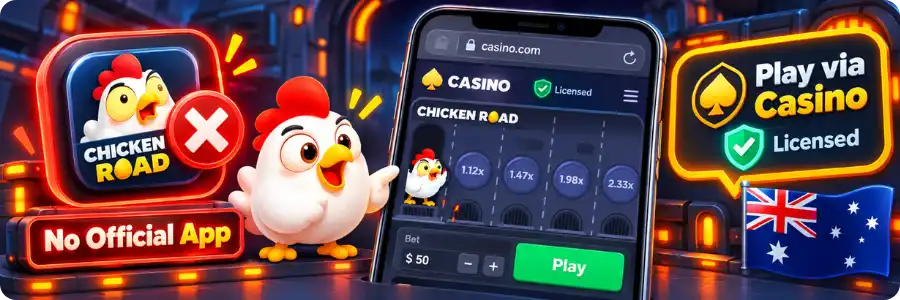
Listings that claim otherwise are usually casino apps carrying the game or copycats to skip. Genuine access ties back to a licensed operator, so anything billed as a Chicken Road official app sold on its own deserves a hard look. A solo download that promises the game alone is usually unsafe, so avoid it.
Add the Game to Your Home Screen in Safari
Pinning the game to your home screen gives you an app-like icon on iPhone, and it takes under a minute. It opens the game full-screen from that icon, with no browser bars in the way. The five steps below set it up in one pass, no store needed.
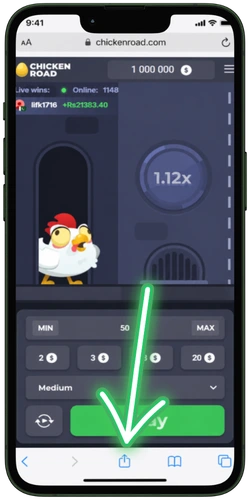
- Open the Share menu
Load the game in Safari, then tap the Share icon, the square with an upward arrow, at the bottom of the screen. This opens the menu that holds every save and send option for the current page.
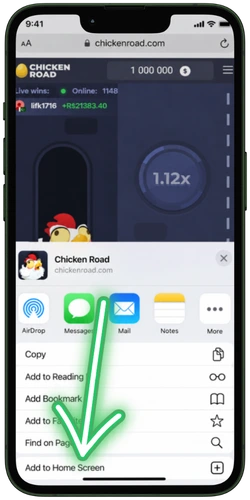
- Tap Add to Home Screen
Scroll down the share sheet past Copy and the bookmark options, then choose Add to Home Screen. The row carries a small plus icon on the right, so it is easy to spot.
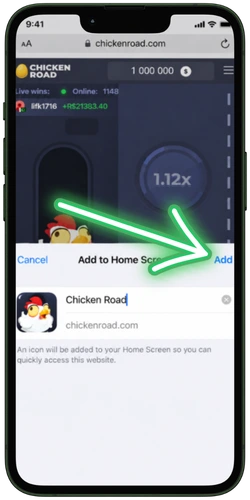
- Press Add
Keep or edit the icon label, Chicken Road by default, then tap Add in the top-right corner. Safari confirms the shortcut and drops you back to the home screen.
- Find the new icon
A Chicken Road icon now sits on your home screen alongside your other apps. It behaves like any app tile, so you can move it into a folder or reposition it as you like.
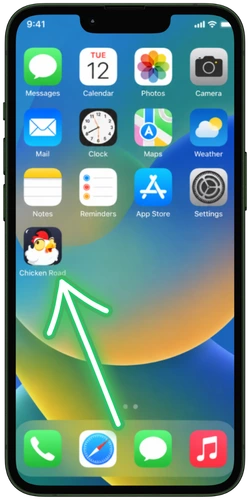
- Launch and play
Tap the icon to open the game full-screen, straight past the browser bars, then set a bet, pick a mode and press Play to start your first round.
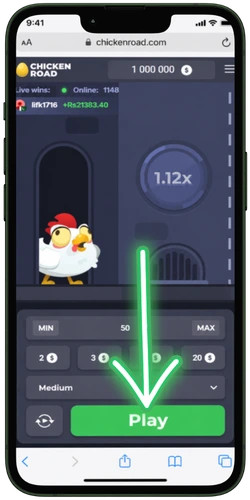
Follow them once and the icon behaves like any app you tap to open. This Chicken Road app download works through the shortcut, so you skip the App Store entirely and still play the same 98% RTP game. Delete the home icon any time by holding it and removing it, just like a normal app.
How to Spot a Fake Chicken Road Game App
Four warning signs separate a fake from the real game, and a quick check protects your data and your kitty before any Chicken Road app australia search leads you astray. The table below flags each one worth knowing first. Any single flag is reason enough to close the page.
| Red flag | Why it matters |
| A different developer on the card | Genuine builds trace to InOut Games, not an unknown studio. |
| Promises of guaranteed wins | No real game can promise a result; it signals a scam. |
| Asks for SMS or contacts access | The game needs neither; the request points to data harvesting. |
| Payment via third-party links | Real top-ups run through the casino cashier, not outside links. |
Hit any one of these and back out before entering a single detail, no matter how polished the app Chicken Road listing looks. Reach the game through a licensed casino you already trust instead. If a listing shows any of these signs, do not enter your details.
Three Ways to Use the App: Chicken Road on Your Phone
Three routes put the game on your phone, and the table weighs them before any Chicken Road app review makes the call for you. One needs nothing, one pins an icon, one asks for a download. Settle the right route by how often you play and whether real money is involved.
| Option | Install needed | Best for | Limitations |
| Mobile browser | None | A quick demo or the odd casual round | Signs out each time; nothing is saved |
| Home-screen shortcut | None | Fast repeat access from an icon | Still needs a casino login for real stakes |
| Casino app | Yes | Regular real-money play with alerts | Takes storage; download and account needed |
Odds stay identical across all three, so the pick is about convenience rather than payout, whichever Chicken Road app you favour. Light players do fine in the browser; a pinned icon suits daily rounds; heavy play earns a casino app. How often you play each week decides which route keeps a place on your phone.
Chicken Road on iPhone and iPad
On iOS, the home-screen shortcut is the simplest route for most Aussie players to reach the Chicken Road app experience. It opens full-screen from an icon and skips the App Store entirely, which suits iPhone and iPad alike. That shortcut method takes under a minute to set up.

A few casinos ship a dedicated iOS build, but that remains the exception, not the rule. Where one exists, a Chicken Road game app installs like any App Store title and adds push alerts for promos. A native build is a bonus, since the shortcut already plays the same 98% RTP game.
Chicken Road Money App: Deposits and Cash-Outs on Mobile
Real-stakes play from a phone runs through a casino account, which is what a Chicken Road money app really means. The game stays the same, but money moves through the casino cashier rather than a standalone wallet. PayID keeps the whole flow clear in the four steps below.
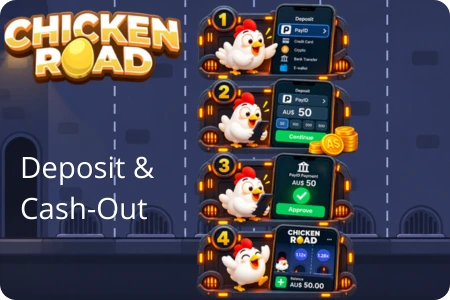
- Open the cashier: sign in to your casino on mobile, tap the deposit or top-up screen, and pick PayID from the list of methods before you enter anything.
- Enter an amount: type a figure in AU$, from the site minimum upward, and double-check it matches what you planned to stake rather than a round number on impulse.
- Confirm in your bank: approve the payment in your banking app, usually within seconds, where PayID links your account without sharing full card or BSB details.
- Return to the game: the balance updates on the casino side, and you reload the game to play for real, with the top-up ready on your next round.
Cash-outs run the same path in reverse, with PayID clearing fast for Aussie players. Keep the same method for deposits and withdrawals so verification stays quick. One KYC check early means later cash-outs land without repeat holds.
Casino App or Mobile Browser?
The call between a Chicken Road app and the mobile browser comes down to how often you play and how much you value quick access. The table weighs both on six practical points. Read the last rows first if privacy and storage matter most to you.
| Criteria | Casino app | Mobile browser |
| Installation | Download required | None, open and play |
| Device space | Takes storage | Uses none |
| Updates | Manual or auto | Always current |
| Login speed | Fastest, stays signed in | Sign in each time |
| Notifications | Push alerts | None |
| Privacy | App sits on device | Nothing installed |
Regular punters who want speed and alerts are better off with a Chicken Road app on the device. Anyone who plays now and then, or guards storage and privacy, should stick with the mobile browser.
Stay Safe on Mobile
A few habits keep mobile play secure, and the checklist covers the five that matter most for Aussie players. None take more than a minute to set up. Treat the first two as non-negotiable before you deposit a cent.
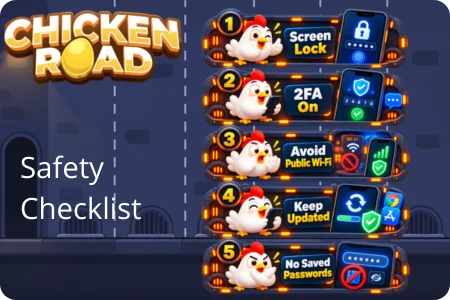
- Screen lock: set a PIN, pattern or biometric so a lost or borrowed phone never hands someone a live casino session, and keep the auto-lock timer short so the screen secures itself when you step away.
- Two-factor login: switch on 2FA at your casino so a password alone is not enough to sign in, which blocks access from another device even if your details leak in a breach elsewhere.
- Skip public Wi-Fi: avoid depositing or playing on open networks in cafes or airports, where traffic can be intercepted; use mobile data or a trusted home connection for anything involving money.
- Update often: keep your OS, browser and casino app on the latest version, since each update patches security holes that older builds leave open to attackers.
- No saved passwords: turn off auto-save and autofill on shared or family devices, so the next person to pick up the tablet cannot open your account with a single tap.
Set these five up once and mobile play stays as safe as desktop. Play for fun with session limits set in the app, stick to money you can afford to lose, 18+ only, and reach Gambling Help Online on 1800 858 858.
FAQ